my ad

Showing posts with label mob tricks. Show all posts

Monday, July 7, 2014

Unbrick Any Android Phone

Normally Samsung android phones are so secure to flash. but you are unlucky and got your phone bricked during flashing,rooting or upgrading.  Unbrick Any Android Phone
Here is a good news for You – A developer come up with a software called one-click unbrick for Samsung android phones. this small utility uses ODIN to repair our Samsung phones. almost all Samsung phones with android éclair and above can be repair with this tool (few exceptions – it is working on some Android 1.5 too)
one-click unbrick tool works on windows , Linux and mac also. it have some bugs in windows version but both Linux and mac working fine. don’t get worried about windows version if you are a window user. developers are continuously working on windows version for its stability Unbrick Any Android Phone
REQUIREMENTS TO UNBRICK YOUR PHONE
  • First install java on your pc if you haven’t java go to Java site and install it.
  • download one-click Unbrick tool
  • window users will need .rar/.zip extractor software , you can download free all in one (7zip) extractor form here.
FOLLOW THESE INSTRUCTIONS CAREFULLY
1. Right-click on the One-Click.jar file, move down to option “7-zip” and then select “Extract to OneClick”.
2. Now you will get a ‘OneClick’ folder.
3. Now copy ‘OneClick.jar’ file and paste it into the ‘OneClickheimdalloneclickresourcesHeimdallPackage’ folder.
4. Right-click on ‘oneclickloader.exe’ file and choose ‘Run as Administrator’.
5. Proceed with the installation of Heimdall.
6. After the installation is complete, you will see the the One-Click UnBrick interface.
%SEO friendly image.jpeg Unbrick Any Android Phone
7. Connect the phone to computer via USB and click on “unsoft brick” button to recover your bricked Samsung android phone.

Android Play Store Not Working Or Opening

Android phones are mostly used phone’s now-days there is lot of phone’s in market some of them are with higher configuration and some of them is with lower but all of the android user may face this problem some time’s Android Play Store Not Working Or Opening and giving this error com.google.process.gapps has stopped error. this is really very irritating experience ever you can’t download any thing form your mobile. every time when you open your play store it crashed and keep off all the time. don’t worry this is very easy to fix there is 2,3 method to fix this problem i will show you all the method’s chose which one worked for you.  Acctually what happend is you app download manager is disabled you need to restart or enable it so you need to do some steps.It shouldn’t really matter on what device you see this error, or with what app/function it occurred, just follow these easy steps

Android Play Store Not Working Or Opening

Method 1 :

1. Go to MENU
2. Go to SETTINGS
3. Go to APPS
4. Look for DOWNLOAD MANAGER under ALL
5. Disable it then enable it
Menu-> Settings-> Apps-> All-> Download Manager (Disable then enable)
If for some reason that doesnt work, try clearing your app cache, or deleting some recently downloaded apps.

Method 2 :

1. Go to MENU
2. Go to SETTINGS
3. Go to APPS
4.Go to All Apps
5. Click the Bottom Left Touch Button ->And Select Reset Apps ->(this will not erase the apps) This Will Only Restore the Apps into its Fixed State.
After follow these steps your problem will solved as soon as possible. %SEO friendly image.jpeg Android Play Store Not Working Or Opening
so here is all about Android Play Store Not Working Or Opening you can easily fix this problem. %SEO friendly image.jpeg Android Play Store Not Working Or Opening
Like post ,give ratings and make your precious comments down it works for you or not. %SEO friendly image.jpeg Android Play Store Not Working Or Opening

Best Photo Editing Software Android

hey guys nowadays i gonna show you best photo editing software. Android mobiles is a tremendous platform have heap of cool feature if your passionate about photography and shot photos when recognize you’ll be able to additionally shot from your Android mobile’s that have recognize nice camera quality thus you’ll be able to shot clear photos any time any wherever. today’s android phone’s have heap of functions and lots of cool apps there square measure are photo editing software for free and a few of them are paid however i gonna show you totally Best Photo Editing Software Android. once you search play store you may get several choices of picture editing software package and a few of them have limitations like adds or have to be compelled to purchase. however don’t fret here is photo software package for complimentary and straightforward to use.

Best Photo Editing Software Android

1. TouchRetouch Free :

This is the one of best and my favorite During those times when you need to erase unwanted elements on photos, this app comes in handy. You can make an entire beach filled with people look like there’s no one around! The free app has limited features but still lets you do what needs to be done – making photos more perfect.

2. AfterFocus :

After focus is the app that makes your picture high quality and take you to the next level of photo editing with this you can create DSLR-is photo with this software and make your picture look professional look Apply Focus on the object that needs focusing and set Mid and BG focus on the background for depth. Once you get the hang of it, you can create stunning photos that seem as if they were taken with a professional Camera

3. Photo Funia :

This is a website named as photofunia.com that have lot of cool feature you just need to select your photo and then everything will be happened in just a minute and your photo is ready with complete new look and with celerity. and this software had lot of cool feature you can try this in your android mobile and There are loads of templates to choose from, all stored in the cloud so it doesn’t take any space on your phone, so an internet connection is required to use the effects.

4. Pixlr-o-matic :

If you think Little Photo had great filters, this is even better as it offers dozens of options. Filters are arranged based on three categories – photo filters, light filters, and photo frames. The only drawback is that you are limited to using one filter at a time for each category. If you wish to apply multiple filters, you would have to save an edited photo and load it again. All this trouble is worth the hassle though because Pixlr-o-matic has no ads whatsoever.

5. Little Photo :

One of our favourites, Little Photo is mostly a photo filtering app with a few basic features like adding frames and rotating pictures. You can adjust the intensity of these filters to suit your taste. It is much easier to use than PicSay but has a few advanced features like multi exposure, burn spot, and body glow.

Conclusion

so here is all about Best Photo Editing Software Android these all the fully free and without any adds or any limitions free of coast photo editing software that can be used in any android mobile phone you just need to click on the link give below  of every part and download which one you like to download and enjoy photo editing from your mobile phone.

How To Root Any Android Phone

What is Rooting?
By default most Android devices do not give you “root access.” Root access is basically full control over your phone and all its workings. Manufacturers disable this by default. They do this for good reason—and it’s not just to control or limit you. If someone had this access and didn’t know what they were doing, they could do some real damage to their smartphone. So manufacturers keep devices locked by default to prevent you from turning your phone into an expensive paperweight.  How To Root Any Android Phone
you can do allot with root phone you can also expand you ram you can make ram of you memory card and play big games on you’r any android phone easily. you just need to follow the step’s given bellow and you can root you’r phone easily.
NOTE: read all steps carefully do the same steps otherwise your phone will be bricked.  How To Root Any Android Phone
  1. First of all you need to download a root file matched for you android phone this is a not a big file just a 1 or 2 mb file just search for you’r mobile model root file . OR comment down i will give you link to download the root file for your android phone.
  2. Then you need to download oDin to root you phone follow the link to Download Odin 3.07 here.
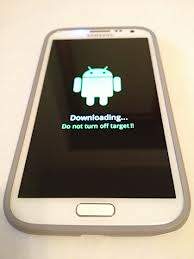
  3.  Power off your android phone  and put it on the Download Mode. To do this, press and hold the Volume Down and Home buttons while pressing the Power button until the Samsung  appears on the screen. this will shown like this picture.
    %SEO friendly image.jpeg How To Root Any Android Phone
  4.  Run Odin as Administrator and connect the phone to your computer via USB cable while in Download Mode.
  5. : If the phone is connected properly, you will see “Added” message in Odin. You will also see COM port with a number in Yellow.
  6.  Click the PDA button in Odin and select the file “anything you download.tar.md5.”
  7. In Odin, check the Auto Reboot and F. Reset Time options.
  8. Click on the START button in Odin to start flashing.
  1. After the flashing is done, you will see a PASS message with green background in the left-most box at the top of the Odin. your phone  will restart automatically. Once you see the home screen, you can unplug the phone from the computer.
  2. if you want to check that your phone is rotted successfully or not just go to play store and find for root app and run this will show you that your is rooted or not.

Saturday, March 8, 2014

How to record a phone call on your Android smartphone

 How to record a phone call on your Android smartphone

  • Can you believe you’ve just been treated this way by a customer service rep? Did a crime suspect just admit to committing the deed? Did you have the chance to talk to your favorite star? Obviously there is more than one reason why you might want to record a call. Here’s how to save a phone conversation on your Android smartphone.
    Android Call Recording App allows user to record conversation of an ongoing-incoming call.
    There are many apps to fulfill this purpose, but the best one we can recommend is Automatic Call Recorder, you can stick with the free version which has everything you need, the pro version isn’t really worth it.


    Automatic Call Recorder

    Record any phone call you want and choose which calls you want to save.


  • When in the app, head straight to the settings (first you’ll be presented with the new app features), where you must enable various setting’s options.
  • Ensure that you have ticked the box for Record calls.
  • Next, under Media settings, change the File Type to AMR, which is in fact better for playback on a third-party app at a later point in time.
  • Set the default Audio Source to Mic if it isn’t already.
  • Close the app. 
  • Open up the phone app and call someone, you can try calling a toll-free number instead of harassing a friend while testing this app out.
  • When the call is underway, you will see the red recording dot at the top left corner of your status bar. Swipe down the notifications and you’ll see that the call is being recorded.
  Once you hang up, there will be a notification telling you that you have one recorded message. Tap on it and it brings you to the recording data where you have the option to play, delete, share, save, add notes, check contact history, contact details as well as call back. The length of time is also posted up top, including the files size.


If you encounter any recording issues or wish to improve voice quality, try recording from a different audio source, or use auto-on speaker mode.
Recorded calls are stored in the Inbox. You can change the destination recordings folder to an external SD card as well. You can set the size of the inbox. The number of saved calls is limited only by your device memory. If you decide that a conversation is important, save it and it will be stored in the Saved Calls folder. If not, old recordings will automatically be deleted when new calls fill up the inbox.


https://play.google.com/store/apps/details?id=com.appstar.callrecorder


Top 10 Best Android Apps

The top 10 Android apps are those apps which makes your phone diffrent from others, your phone looks like more fast ,intelligent & much more coolness

Swiftkey KeyBoard


SwiftKey 3 is one of the most intuitive keyboards you can download for your Android devices. Thepredictive text is phenomenal, and there’s even a tablet version which offers a split keyboard for landscape mode.


Splashtop Remote Desktop HD

Sometimes there’s a need to access your computer after you’ve already left the office. Splashtop lets you access your computer from everywhere you can get an internet connection, and it’s the only application out there that shows the entire computer screen vs. a shrunk-down or partial version Splashtop is the easiest and fastest remote desktop app for accessing your Windows or Mac computer using your Android phone or tablet, from anywhere and at anytime!
Use Splashtop for free to access your computer on the local network with best-in-class video streaming performance. Get full access to ALL of your applications, documents, emails, full browser with Flash and Java support, and games. Also get full access to your entire media library and documents. And more!
                                                  To begin, download the Splashtop Streamer for the computer(s) you would like to access. It’s available for the Mac, Windows, and Linux. Once installed, you need to create a login for the Splashtop service. While the original Splashtop required a Google account for remote access, Splashtop 2 now has its own login system. 
  More...

Poweramp

Poweramp is the ultimate music player application for Android: the 10 band EQ and support for most popular music file formats and gap-less playback set Poweramp apart from the others.

Key Features:
- plays mp3, mp4/m4a (incl. alac), ogg, wma*, flac, wav, ape, wv, tta, mpc, aiff (* some wmapro files may require NEON support)
- 10 band optimized graphical equalizer for all supported formats, presets, custom presets
- separate powerful Bass and Treble adjustment
- stereo eXpansion, mono mixing, balance
- crossfade
- gapless
- replay gain
- plays songs from folders and from own library
- dynamic queue
- lyrics support, including lyrics search via musiXmatch plugin
- embed and standalone .cue files support
- support for m3u, m3u8, pls, wpl playlists
- OpenGL based cover art animation
- downloads missing album art
- custom visual themes, lot of skins available on Play
- 4 widget types with many selectable styles, advanced customization; Android 4.2 lock screen widgets
- configurable lock screen
- headset support, automatic Resume on headset and/or BT connection (can be disabled in settings)
- scrobbling
- tag editor
- fast library scan
high level of customization via settings


Soundhound

When you hear a song playing and like it, useSoundhound to figure out who the artist is and the name of the song. When Soundhound figures out what song this, you can bookmark it for later and even see the lyrics as you’re listening to as the song plays. You can now save your search history in the SoundHound cloud and sync it between all of your devices! Just register for a SoundHound account.Other Amazing Features:
◦ Blazing fast music recognition
◦ The world's only singing and humming recognition
◦ LiveLyrics: see lyrics move in time with the music
◦ SoundHound Headlines: brings you free song streams, new artists, and more
◦ Beautifully optimized for tablets
◦ Real-time Facebook and Twitter updates from your favorite artists
◦ Facebook and Twitter sharing, listen-on-startup, and geotagging

XBMC

XBMC is the ultimate media center software, because it gives you a single interface for accessing all of your media from all of these different places. Even better: it does so using a remote-friendly interface, so with a few taps of your remote you can browse your digital collection of music and videos, explore some of the most popular media sites on the web or check out live Internet TV from around the world.  More 


ES File Explorer

ES File Explorer File Manager is free file andapplication manager designed for mobile Android platforms by EStrongs.

ES File Explorer File Manager provides mobile phone users a fully-featured file manager thatexplores phones and PC’s by leveraging LAN,FTP and Remote Bluetooth. It also allows users to access file shares on networks as well as local disk like phone memory and SD card. Users can also stream audio and videos using chosen player from PC and view text and images and other files with associated application.

Overall, ES File Explorer File Manager brings a better solution to manage files from both mobile phones and PC's. It's remarkably easy to use without any frills which makes mobile phones one step away from any actual desktop computers.


Kingsoft Office 

Kingsoft Office is the only mobile Office with full-features FREE. Support for running on Android 2.1 and above system. User-friendly & nice UI interface!  
★ Rich editing features! All is FREE!
★ Small Size, Stable Operation, and Special interface!
★ Support 23 kinds of files, including DOC/DOCX/TXT/XLS/XLSX/PPT/PPTX/PDF
★ Built-in file manager that can automatically organize your office document
★ Tight integration with the mail application
★ Support cloud storages such as Google Drive, Dropbox, Box.net and other services with WebDAV protocol
★ A variety of gestures operations, which make your work more interesting
★ Support different Read Mode which be closer to the users’ need


Airdroid

AirDroid is our favorite tool for remotely accessing your smartphone. The app, which is free and available on the Google Play Store, uses your local Wi-Fi network to seamlessly connect your Android device to your PC or Mac. Once connected, you can interact with your phone from a Web browser or desktop widget, which gives you hardware information, battery life, and even access to your calls and messaging. More


Dolphin Browser

Dolphin is my browser.Dolphin makes mobile browsing easy, adapting to the way you want to browse with a personalized home screen, voice and gesture control, customizable settings and sharing features.
With lighting fast speed, Dolphin blows the rest of the mobile browsers out of the water.
Features:
★ Gesture - Let your inner artist out and create a personal Gesture (symbol) to access the mobile and desktop websites you use the most.
★ Sonar - Dolphin listens and lets you use your voice to search on the Internet, share on your favorite social networks, bookmark favorite website and navigate.
★ Add-on – Beef up your mobile Internet browser experience by installing the Add-ons for the tasks you need at your fingertips. With more than 60 and counting, Dolphin Add-ons enables any action to be done right within the mobile browser. You can check out the Add-on features with 3 preloaded on your right Sidebar.
★ Theme – Customize theme colors, wallpapers and skins to make Dolphin your own
★ Web App Store - The all-new Dolphin web app store offers access to the most popular web apps so you never have to leave the browser. Choose from over 200 web apps, including Facebook, Twitter, Wikipedia, Amazon and more.
★ Home Screen - Adding applications to your home screen is super easy. Plus you can quickly organized them for one touch access.
★ One-tap Share - Tweet web pages, post them to Facebook, share via email or grab any content and save it directly to Evernote or Box.
★ Tabbed browsing - No need to toggle between screens, tabbed browsing 

Clean Master 

Clean master is the most important app that must install in every phone .
 Memory Boost/Task Killer - Boosting apps and games speed is much easier with Clean Master.★ Clean - Delete those junk files (cache and residual) that take up valuable storage spaceClear - Protect your privacy by deleting personal information like your search and browser history★ App Management - Move apps to an SD card, remove pre-installed apps and backup .apk files